
Milestones
Milestone List
Path: Projects -> Milestones
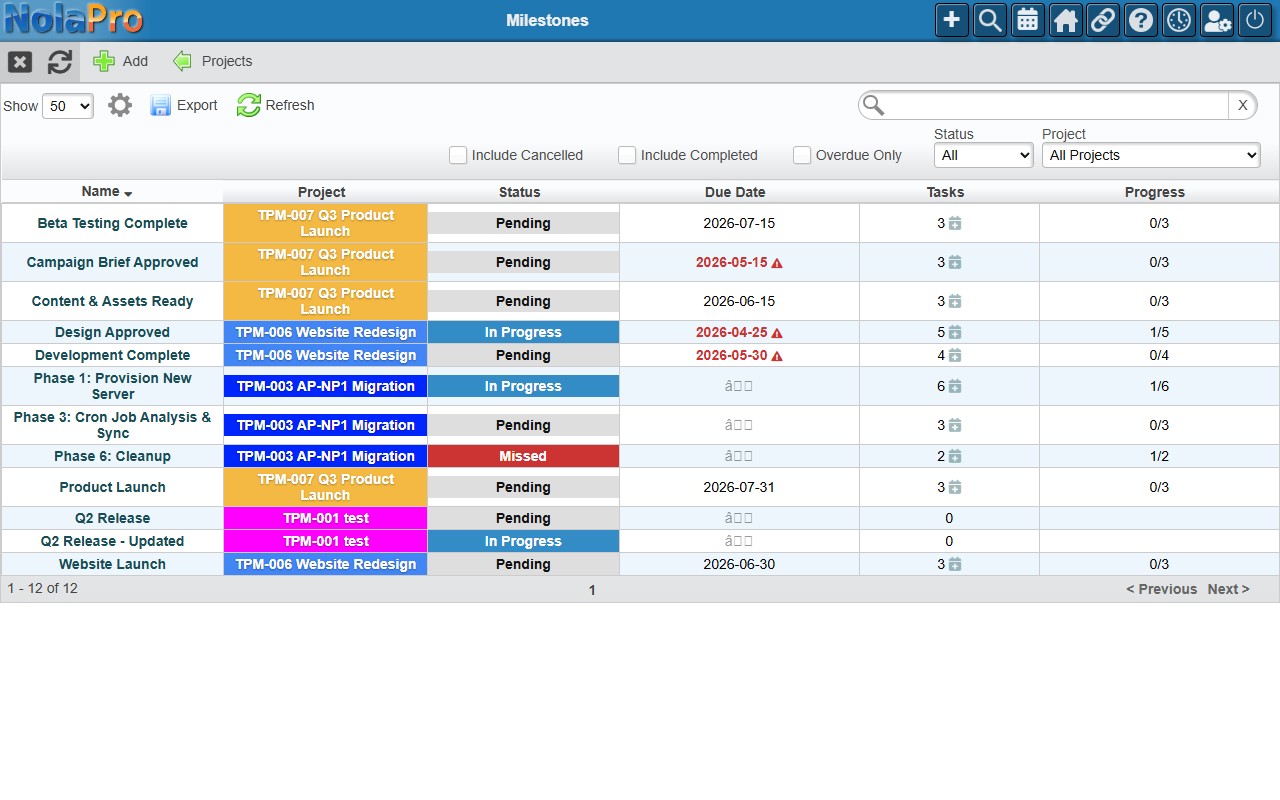
Shows all milestones across all projects.
| Column | Description |
|---|---|
| Name | Milestone name. Click to open. |
| Project | Project code and name. |
| Status | Pending, In Progress, Completed, or Missed. |
| Due Date | Target completion date. |
| Tasks | Number of tasks linked to this milestone. |
| Progress | Done/Total tasks progress bar. |
Filters: Project, Status, Include Cancelled.
Creating a Milestone
- Click Add in the taskbar.
- Fill in the form: Name (required), Description, Project (required), Status (defaults to Pending), and Due Date.
- Click Save.
Editing a Milestone
Click a milestone name in the list. The edit page has a Details tab (the same form as Add) and a Tasks tab (all linked tasks, with an Add Task button).
Auto-complete: When all non-cancelled tasks linked to a milestone reach a complete status, the milestone automatically changes to Completed.
Cancel Milestone: Use the Cancel button in the taskbar. Cancelling unlinks all tasks from the milestone (they are detached, not cancelled).