
How to Close an Accounting Period and Year
Closing has two layers. Closing a month sets a posting status (Open, Partially Closed, or Block All Posting) for that calendar month, optionally down to the individual module (AP, AR, Inventory, Payroll, Direct GL), so finalized periods can no longer accept new or backdated postings. Closing the year posts an automatic closing voucher that reverses every income and expense account for the period and rolls the net into the company's Retained Earnings account, carrying it forward into the new year.
Always post any outstanding (unposted) journal entries before you close, because a closed month rejects new postings and unposted entries are left out of the year-end roll-up.
Step 1: Set the Posting Status for Each Month
Where: Ledger -> Journal Entries -> Close Month
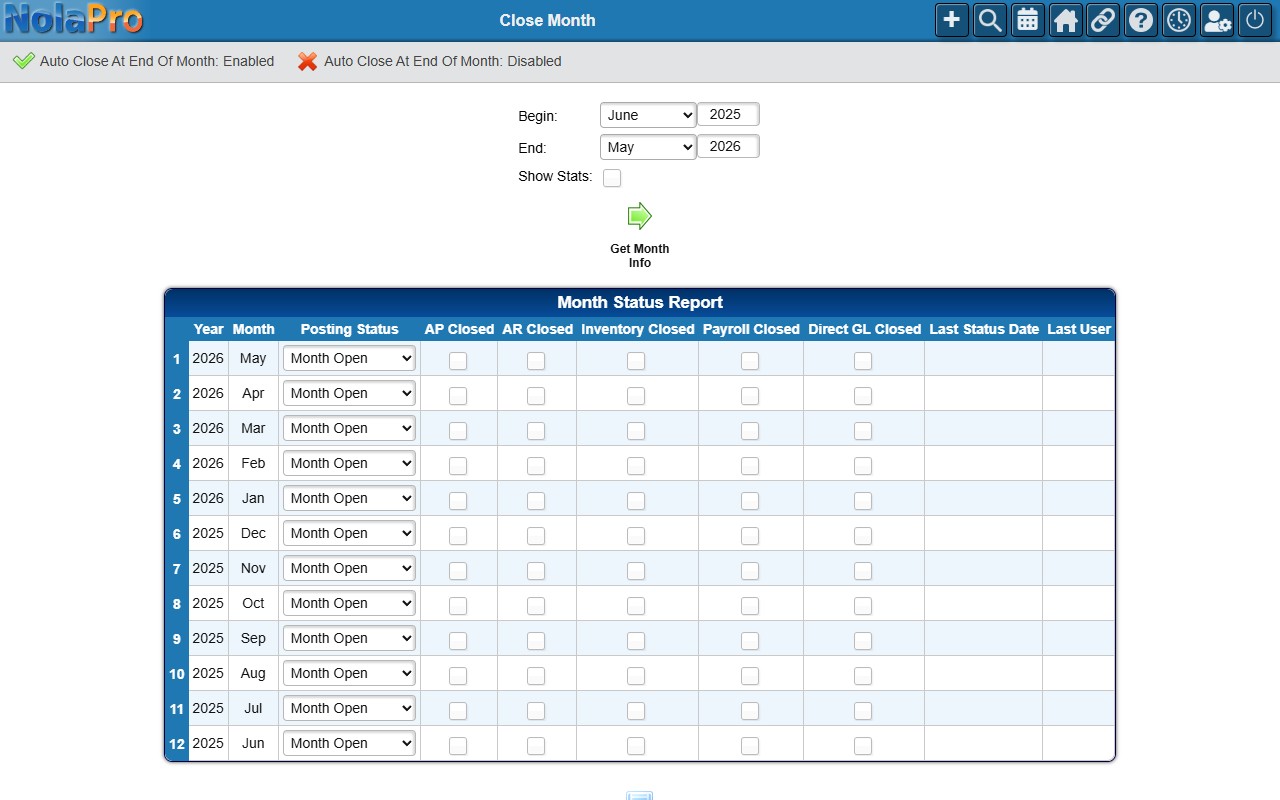
1) Choose the Begin and End month/year and click to load the Month Status Report, which lists one row per calendar month, newest first.
2) Optionally tick Show Stats to add columns for total transaction sets, unposted transaction sets, posted debits, and posted credits per month. When the unposted count is greater than zero it links to the GL Post screen so you can post those sets first.
3) For each month, set a Posting Status: Month Open allows everything, Partially Closed lets you close individual modules, and Block All Posting locks them all.
4) When Partially Closed, tick the per-module AP Closed, AR Closed, Inventory Closed, Payroll Closed, and Direct GL Closed boxes as needed. Choosing Block All Posting ticks all five automatically (and prompts you to post unposted sets first); a Change link unlocks them again.
5) Click Save to commit every changed row.
Step 2: Automate the Month-End Close (optional)
Where: Ledger -> Journal Entries -> Close Month
1) Beneath the report, use the Auto Close At End Of Month toggle to turn an automatic close on or off. When enabled, a scheduled job runs at the start of each month and closes the prior month for the company. The toggle flips immediately without reloading the page.
Step 3: Post Outstanding Vouchers, Then Close the Year
Where: Ledger -> Journal Entries -> Close Year
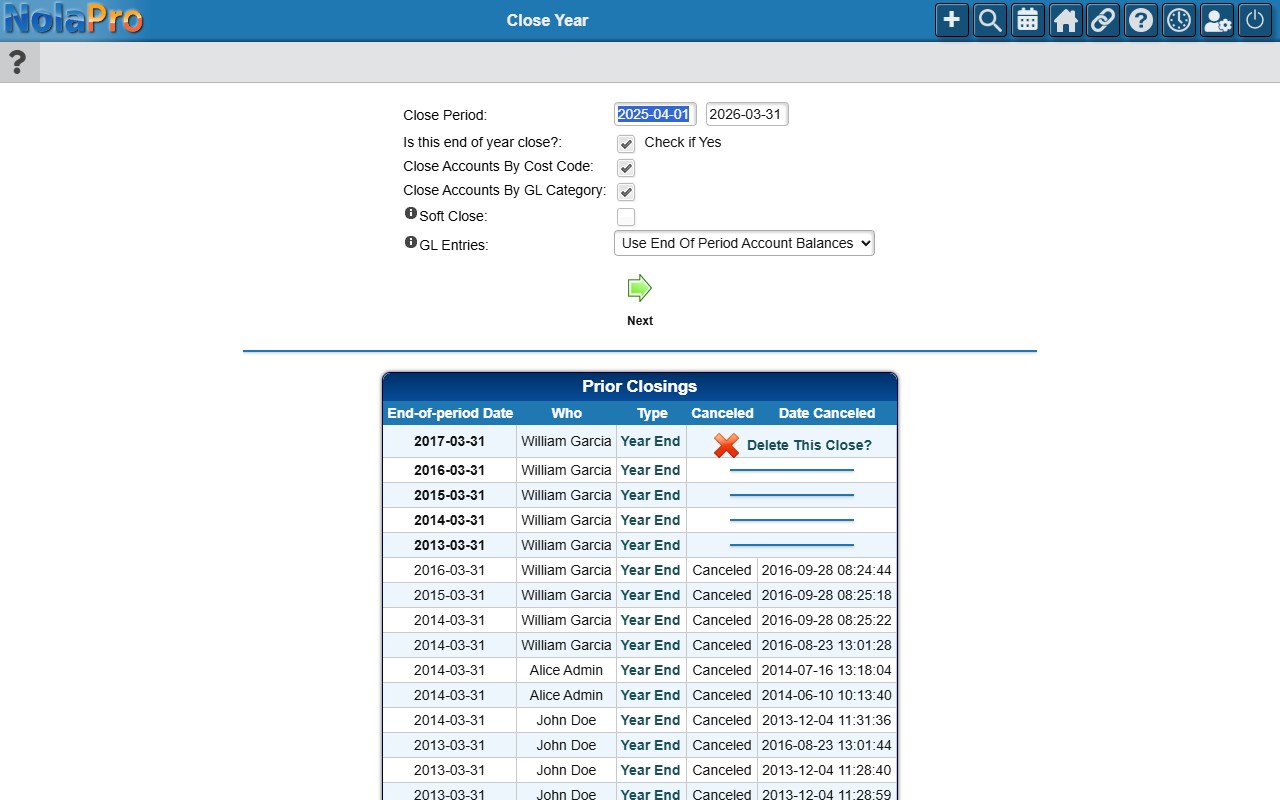
1) If the company has unposted journal entries dated before the proposed year-end, a warning shows the count. Use Show Vouchers to list them and Post Now to open the GL Post screen, and post them before closing.
2) Confirm the Close Period — Begin and Close Period — End dates (they default to the most recent fiscal year). On a 4-4-5 calendar these are replaced by a single Close Fiscal Year number input.
3) Leave Is this end of year close? checked so the closing voucher zeroes income and expense accounts and rolls the net to Retained Earnings.
4) Use Close Accounts By Cost Code to split the closing entries per cost code, and the GL Entries selector to choose between summing entries in the date range or using end-of-period account balances.
5) To preview without committing, tick Soft Close first; it posts a tentative voucher you can delete later.
6) Submit and answer the confirmation prompt to post the closing voucher.
Notes
- A Retained Earnings type GL account must exist for the company before any close can run; without one the Close Year page refuses to render the form.
- Month status flags are advisory on this page; the actual blocks are enforced by the AP, AR, and other modules, which refuse to post into a month flagged closed for them.
- A soft close does not record a permanent closing; it can be removed any time from the Soft Closings table, and running a normal close afterward removes the soft close before posting the permanent voucher.
- "Use Entries In Selected Date Range" sums posted entries within the period; "Use End Of Period Account Balances" uses each account's balance as of the end date (including prior closing entries), which is useful when re-closing after late entries.
- Re-closing the same end date deletes the prior closing voucher and cancels its log record before posting a fresh one.
- Only the most recent active prior close can be cancelled directly from the table; cancel newer closes first to reach an older one.
- Each currency in the period rolls to its own Retained Earnings line on the closing voucher.